
🃏
Charades Game Guide: How to Play and Score
A digital charades word generator for playing with real people in one room. Three modes, eight categories, three round lengths - free, no download.
▶️ Play Now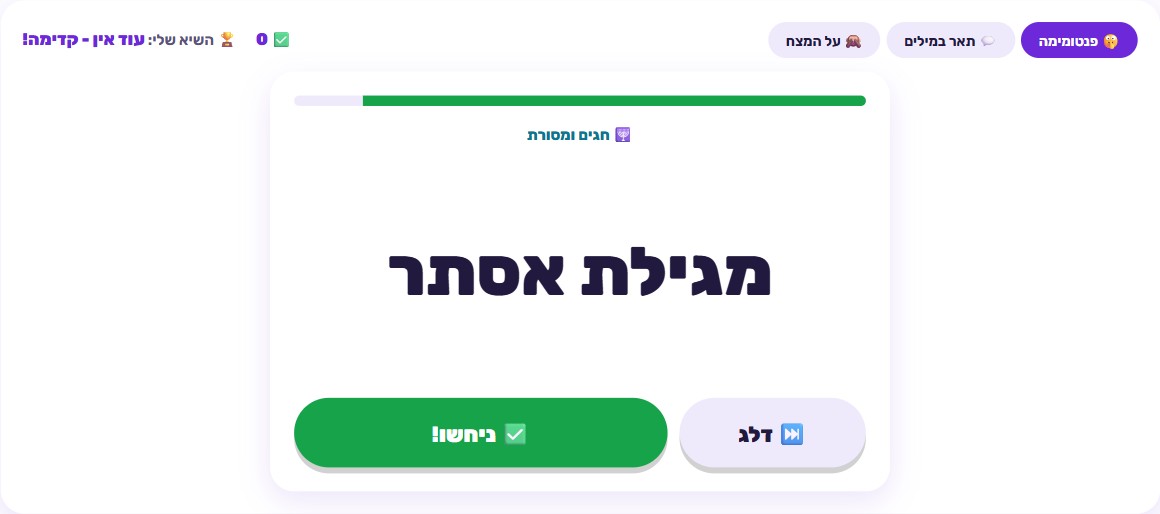
🎯 How to play
- Pick a play mode: Mime (act it out silently), Describe (describe it in words), or Forehead (hold the device to your forehead).
- Choose a word category from eight options, based on who's playing.
- Choose your round length - 60, 90, or 120 seconds.
- Start the timer and act out or describe the word on screen without saying it.
- Mark "correct" when your team guesses it, or "skip" if you're stuck - every correct guess adds to your score.
- When time runs out, check the score and try to beat your best on the next round.
Where charades actually comes from
Charades isn’t a new invention - it’s one of the oldest, most well-documented word-guessing party games around, with genuine roots as a parlor game. Early documented versions were especially popular in 18th and 19th century France and England, where the original game was actually verbal: one team acted out a word by performing scenes hinting at its syllables, often without speaking at all. Over time, especially through the 20th century, the game evolved into the version we know today - acting out a whole word using gestures only, with no sound, while others guess. That evolution spread the game into nearly every culture, largely because it needs almost nothing to play - no equipment, no prep, not even a fully shared language. That’s exactly why it has survived for centuries and still shows up at every family gathering.
The digital version on this site keeps that same core idea intact - it just solves one annoying problem from the old version: who prepares the words. Instead of slips of paper, a pen, and someone thinking up a word list in advance (or printing and cutting out cards for a physical set), the tool generates a word with one click, so all the attention goes to actually playing instead of managing the game.
Why a group guessing game like this wins at family gatherings
A few things make charades-style games the safest choice when a mixed-age group is in one room:
Zero setup, zero equipment. No cards, no board, nothing to hunt for before you start. Open the page, pick your settings, and you’re playing within a minute. That matters a lot for spontaneous get-togethers - there’s no “let’s go set the game up” barrier that quietly kills the idea before it happens.
A wide age range, all at once. Unlike games that require reading, math, or specific knowledge, charades works with a six-year-old and a grandparent in the same round - everyone contributes at their own level, whether that’s acting, guessing, or just laughing at the result.
Active participation instead of passive watching. This is the biggest difference between this game and a screen. Every second of a round, someone is acting or describing out loud, and someone else is shouting guesses. There’s no long wait between turns that lets kids check out - even people not actively performing still have to guess out loud, so everyone stays engaged the whole time.
Running a good charades session
A few practical choices make the difference between a session that flows and one that drags.
Split into teams. Most families split into two or more teams and pass the device between them each turn - one team acts or describes, everyone else guesses, then teams swap. Keeping score between teams is entirely optional; plenty of families skip it and just use the personal-best tracking for the fun of it instead.
Match round length to the group. With young kids or a group playing for the first time, 60 seconds is plenty and keeps things from dragging - short enough to hold focus, and it takes the pressure off whoever is performing. More experienced groups, or ones that want a real challenge, do better with 90 or even 120 seconds, which leaves enough time to work through harder words instead of giving up on them right away.
Rotate categories. Instead of sticking to one category all night, switch it up every few turns. That keeps things unpredictable and lets you match the difficulty to whoever’s turn it is - animals or actions are a great fit for a young kid’s turn, while jobs or characters can be a real challenge for older players.
Tips for each mode
Mime mode
No sound is allowed here, which is exactly what makes it both hard and funny. Key tip: big, simple gestures land faster than detailed, precise ones. Instead of trying to “draw” the exact shape of the word in the air, one big gesture that captures the essence (a high jump for an animal that jumps, instead of trying to trace its outline) gets your team guessing much faster. Time is the scarcest resource here - every second spent on unnecessary detail is a second not spent on the next guess.
Describe mode
Here you talk, but you can never say the word itself. Tip: give a broad category hint before diving into specific clues. If the word is “elephant” in the animals category, opening with something like “this is a very large animal” immediately narrows your team’s guessing space, and only then should you add sharper details. Teams that jump straight to the most specific clue (like “it has a trunk”) waste precious time on guesses that are too far off, because listeners don’t have the general frame yet to know where you’re headed.
Forehead mode
This classic variant - holding the device against your forehead so everyone but the guesser can see the word - needs good teamwork, since clues have to come from several people at once. Tip: give clues from most obvious to least obvious, not the other way around. Under time pressure it’s tempting to open with a clever or subtle clue that feels fun to give, but that’s wasted time. The clearest clue first (a category name, or a simple description) builds a foundation, and only then is it worth sharpening with subtler details if time allows.
The word categories
The tool offers eight categories: animals, actions, food, jobs, feelings, characters, sports, and a Jewish-themed category. Animals and actions tend to be the easiest to act out, since they have clear, natural movements - a good starting point for young kids or the first round of the night. Feelings are among the hardest and funniest to mime - try acting out “disappointment” without words, and you’ll see exactly why. The Jewish category adds content you won’t find in a standard charades set, which makes it a nice fit for a family table around a holiday. Mixing categories across a session keeps the words varied and genuinely surprising, rather than repeating the same handful of easy ones.
How scoring works
Each round runs on the length you picked - 60, 90, or 120 seconds - and every word your team marks “correct” before time runs out adds to your score. Skipped words simply don’t count either way, so there’s no penalty for giving up on a word that’s too hard - just a missed opportunity. Your final score is the number of words guessed times three points, and your best score is tracked separately for each mode, so you can chase a personal record in Mime and in Describe without them mixing together.
Similar games on the site worth trying
If you enjoyed the group energy of charades, check out Toy Story Trivia - a fun family trivia quiz built around familiar characters. Anyone who likes fast decisions under time pressure will enjoy True or False, which tests speed and knowledge together. And for one more quick round against the clock to close out the evening, Flash Quiz is a great pick.
🧠 Test Yourself
Answer all three questions correctly to earn 100 stars!
Frequently Asked Questions
Is this charades game an app I need to download?
No, it's a free digital tool that runs right in your browser with nothing to install - open the page and start playing, on mobile or desktop.
Is there a printable version of the charades words?
No, this is a digital word generator, not a printable card set - the word appears right on your device's screen. That's actually what makes it more convenient: no cards to print, lose, or shuffle beforehand.
What's the difference between the three play modes?
In Mime mode you act out the word using only gestures, no talking at all. In Describe mode you describe the word out loud without ever saying it. In Forehead mode you hold the device against your forehead so everyone but you can see the word, and they give you clues.
What word categories are included?
Eight categories: animals, actions, food, jobs, feelings, characters, sports, and a Jewish-themed category - a mix that covers easy words for young kids and trickier, funnier ones for everyone else.
Is there a special version for adults?
No - this tool was built as a family party game for every age, not a separate adults-only edition. All eight categories are meant to be played together, kids and parents in the same round.